Share a Draft advanced link controls
A preview link is private by default, but some reviews call for tighter controls. Share a Draft can limit how many people open a link, bind a link to named reviewers who confirm their email address, and restrict a link to trusted IP addresses. Administrators can also review every link on a site, revoke links in bulk, and pause all links at once while investigating a suspected leak.
These controls are set when a link is created. The basic steps for creating a link are described in Share a Draft.
Prerequisites
To use the restrictions on this page, the following must be in place:
- Share a Draft must be enabled for the application.
- To bind a link to named reviewers, the site must be able to send email. On the WordPress VIP Platform, verification codes are sent through VIP’s managed email delivery.
- To revoke every link on a site or to pause links, the user must be an administrator.
Limitations
Logged-in users can always use a shared link. If a user who is logged into WordPress with enough permission to view the content via a regular preview, their view does not count against any limit.
- Restrictions are fixed when a link is created. To change them, revoke the link and create a new one.
- An IP restriction limits where a link can be opened, not who opens it. VPNs, mobile networks, and shared connections can all blur the result. Use IP restrictions in addition to the other controls, not in place of them.
- A limit on the number of people counts browsers, not individuals. Someone who opens the link in a private window is counted as a new viewer.
Limiting how many people can open a link
To cap the number of viewers, set Maximum uses when generating the link. A limit of 1 creates a one-time link. Once the limit is reached, further visitors see a notice that the link has been used up.
A browser that has already opened the link can open it again without using another view. Link previews from chat apps and crawlers are not counted.
Binding a link to named reviewers
To make a forwarded link useless to anyone else, bind the link to the reviewers who should open it:
- In the Share a Draft panel, enable Restrict to reviewers.
- Enter the email address of each reviewer.
- Select Generate preview link and send the link to the reviewers.
The first time a reviewer opens the link in a browser, the reviewer is asked for an email address. If the address is on the link’s list, Share a Draft emails a 6-digit code to it, and the draft opens once the reviewer enters the code. An address that is not on the list receives no email and cannot open the draft.
Reviewers must be able to receive email at the address the author entered. Advise reviewers to check spam folders if the code does not arrive.
Restricting a link to IP addresses
To limit where a link can be opened, enter addresses or ranges in Allowed IP ranges when generating the link. A visitor whose address is not allowed cannot open the draft.
On the VIP platform, the edge network passes each visitor’s real IP address to WordPress, so IP restrictions work without additional code.
Trusted IP ranges for the whole application
Enabling the integration makes a Trusted IP ranges setting available in the VIP Dashboard. Addresses or ranges entered here, such as office networks, are accepted by every preview link on the application.
A visitor who matches either the application’s trusted ranges or the ranges on an individual link is let in. The application-wide ranges can therefore only widen where links open, never narrow it. The editor and the Preview Links screen show which ranges apply to a link.
Reviewing links across the site
The Preview Links screen in the admin menu lists every link on the site.
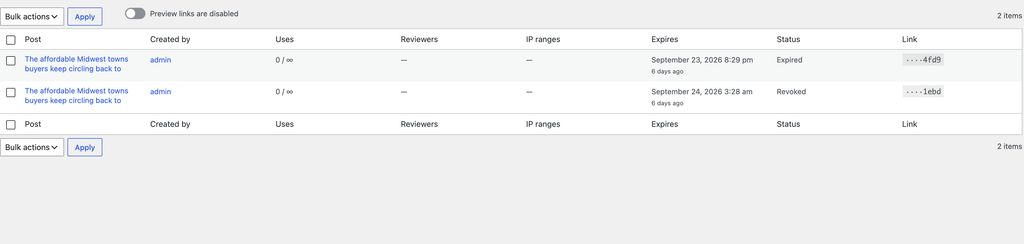
Each row shows:
- The post the link belongs to
- Who created the link
- How many times the link has been used
- Any reviewers and IP restrictions
- When the link expires
Select Revoke in a row to disable a single link.
Revoking links in bulk
To revoke several links at once:
- On the Preview Links screen, select the checkbox at the top of the table to select the links on the current page.
- If the site has more links than one page shows, select Select all to extend the selection across every page.
- Select Revoke from the bulk actions and apply it.
To revoke everything one person created, first select the person’s name in the Created by column so that the table shows only their links, then select all. Revoking every link on the whole site is limited to administrators.
Bulk revoking works through links in batches. On a site with a very large number of shared posts, the remainder is finished in the background within a few minutes, and links not yet reached keep working until then.
Pausing every link
If a link may have leaked but it is not clear which one, an administrator can pause all preview links on the site with the toggle at the top of the Preview Links screen.
While links are paused, no link works and reviewers see a notice that preview links are temporarily disabled. Pausing does not change any link. When an administrator switches links back on, each link works as before, with its original expiry, usage limit, and reviewers. Links that expired during the pause stay expired.
While links are paused, the Preview Links screen shows who paused them and when, and the block editor warns anyone creating or managing links.
Pausing is the safer option when the source of a leak is unknown, because revoking every link would require creating and resending every link that reviewers are still using.
When a user leaves
When a WordPress user account is deleted, every link that user created is revoked automatically. Changing a user’s role does not revoke their links, so that reviews already in progress are not cut off. Developers can add revocation on other events. See Customizing Share a Draft.
Settings in the VIP Dashboard
Enabling the integration makes 2 optional settings available in the VIP Dashboard. Share a Draft works without either of them. See App Integrations for where integration settings are managed.
| Setting | Description | Default |
|---|---|---|
| Expired link retention | How long an expired or revoked link is kept, so a returning reviewer is told why the link stopped working. | 21 days |
| Trusted IP ranges | Addresses or ranges accepted by every preview link on the application. | None |
A site can also set retention in code, and the code setting takes precedence. See Customizing Share a Draft.
Last updated: October 20, 2026