Setting up the Integration
Enable Safe Publish through the Integration Center in the VIP Dashboard. Any application in the organization can be connected, and configuration can start from either the source or the destination.
- In the VIP Dashboard, select the application, then select the environment to configure from the environment switcher.
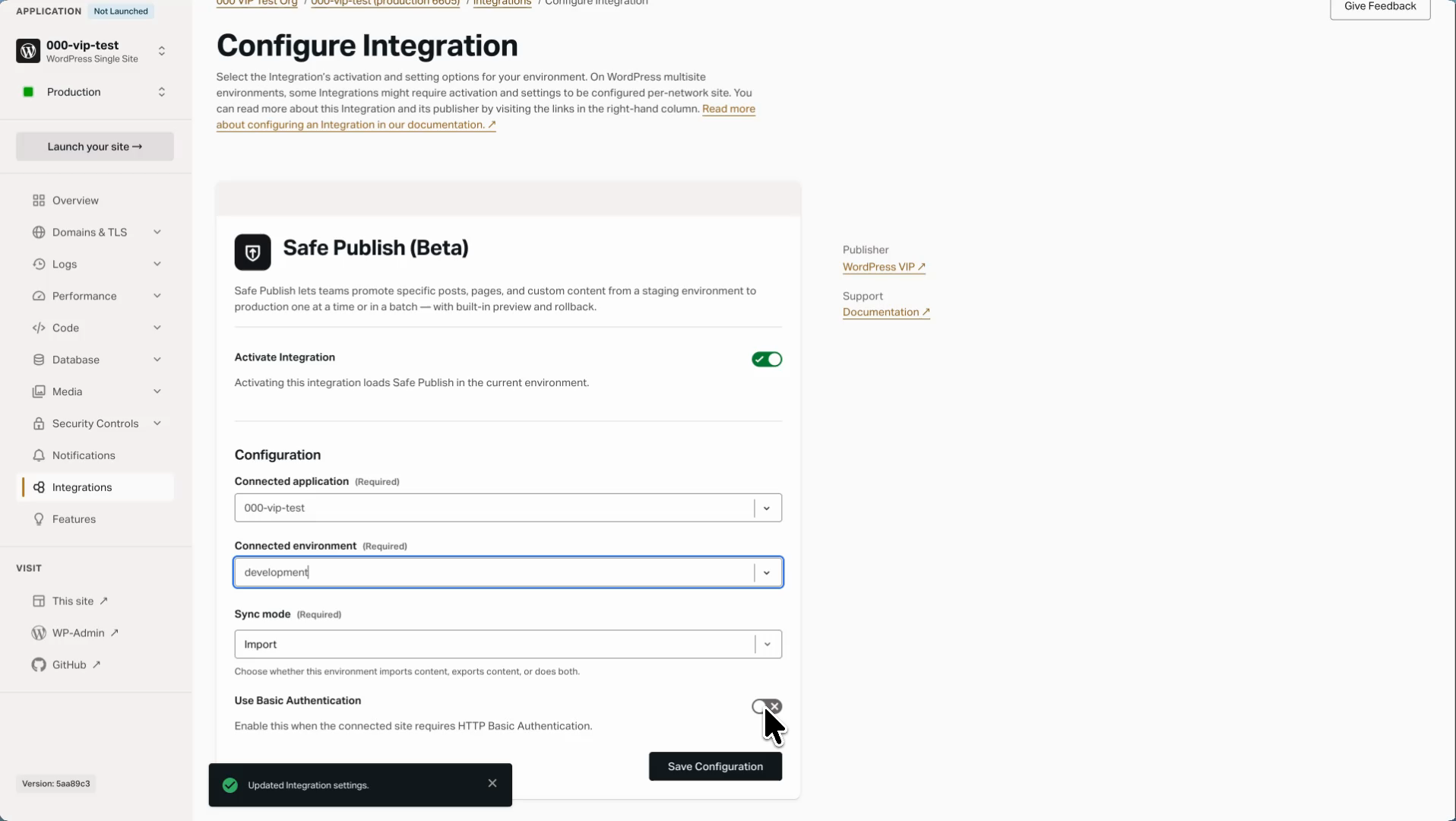
- Select Integrations, then select Safe Publish to open its Configure Integration page.
- Enable Activate Integration. Activating the Integration loads Safe Publish in the current environment.
- Under Configuration, set Connected application and Connected environment to the environment this one exchanges content with.
- Set Sync mode to Import, if this site is the destination.
- Leave Use Basic Authentication disabled unless the connected site is protected by HTTP Basic Authentication.
- Select Save Configuration.
Changes can take a few minutes to apply.
The other environment is configured automatically. Activating the Integration provisions the shared secret that signs requests between the two sites and copies it to the connected environment, so both ends always hold the same value.
On WordPress multisite, activation and settings are configured per network site. Activating at the environment level is not enough. Configure a connection for each network site that needs it.
Last updated: September 02, 2026