Analyze shipped logs
Analyzing shipped log files can provide crucial insight into an application’s quality of performance and the ways users are interacting with site content.
The JSON-formatted log files are human-readable, but the logged data can also be ingested into a log management solution application to provide additional analysis, visualization, and understanding.
Some common log management applications for ingesting shipped data, depending on the type of logged data and desired purpose:
- ELK (Elasticsearch, Logstash, Kibana): Filter and view.
- Splunk: Search, monitor, and analyze.
- Data Dog: Understand development issues.
- Botify: Reveal SEO issues.
- GoAccess: Visualize and analyze.
GoAccess
GoAccess is an open source tool that can be used to visualize data for HTTP request logs from edge and origin to can gain deeper insights into an application.
For additional information about GoAccess configuration and troubleshooting, refer to the GoAccess manual.
Prerequisites
- Log Shipping must be enabled for HTTP request edge logs and/or HTTP request origin logs.
- Shipped logs must be downloaded from the cloud storage bucket and onto a local computer.
Install
To install GoAccess, navigate to their download page and find specific instructions for the local machine’s operating system.
- For macOS, using homebrew is recommended:
brew install goaccess - For Windows, there is a choice between a specific Windows implementation called CowAxess which provides an installer file, or using the Windows Subsystem for Linux and following the Linux installation steps.
Prepare compressed log files for reporting
The shipped HTTP request logs are delivered as a series of gzipped (archived) JSON log files. The shipped files must be unarchived before they can be parsed by GoAccess.
This example command demonstrates how to uncompress a gzip (.gz) archive named 17_50_0.gz:
gunzip 17_50_0.gz
The command above will remove the 17_50_0.gz file and create a file named 17_50_0 with the uncompressed content.
Create and view a report
Note
If the local machine locale is not set to English, LC_TIME will need to be set in order to process the logs:
LC_TIME="en_US.UTF-8" bash -c 'goaccess access.log --log-format=COMBINED'
Additional formatting options will likely need to be set in the command line or in a GoAccess configuration file in order to successfully ingest the JSON-formatted HTTP request log files.
Refer to the GoAccess manual as the most accurate and up to date reference for format options and configurations.
Use the goaccess command in a terminal to view a report.
In this example command goaccess is accessing multiple uncompressed log files, separated by a space:
goaccess 17_50_0 17_55_0 18_00_0 18_05_0 18_10_0
To create an HTML report, run a command similar to the following example:
goaccess 17_50_0 17_55_0 18_00_0 18_05_0 18_10_0 > logreport.html
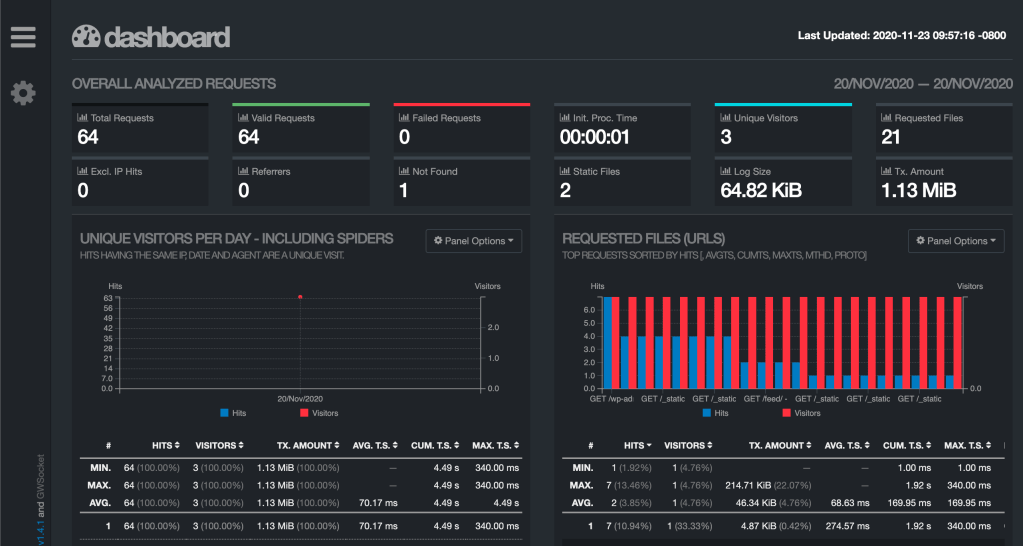
Opening up the logreport.html file will display the log information in a set of graphs similar to the example screenshot provided below.

Last updated: March 12, 2026